Run the Aurora backend remotely
Remote execution is a capability of geoxplain-aurora-adapter, not a requirement of the GeoXplain viewer. The backend keeps local and remote Aurora computation behind the same run_* API. Omitting remote uses the current process and requires a visible GPU. Supplying a URL sends the request to an HTTP listener and polls until a result is available.
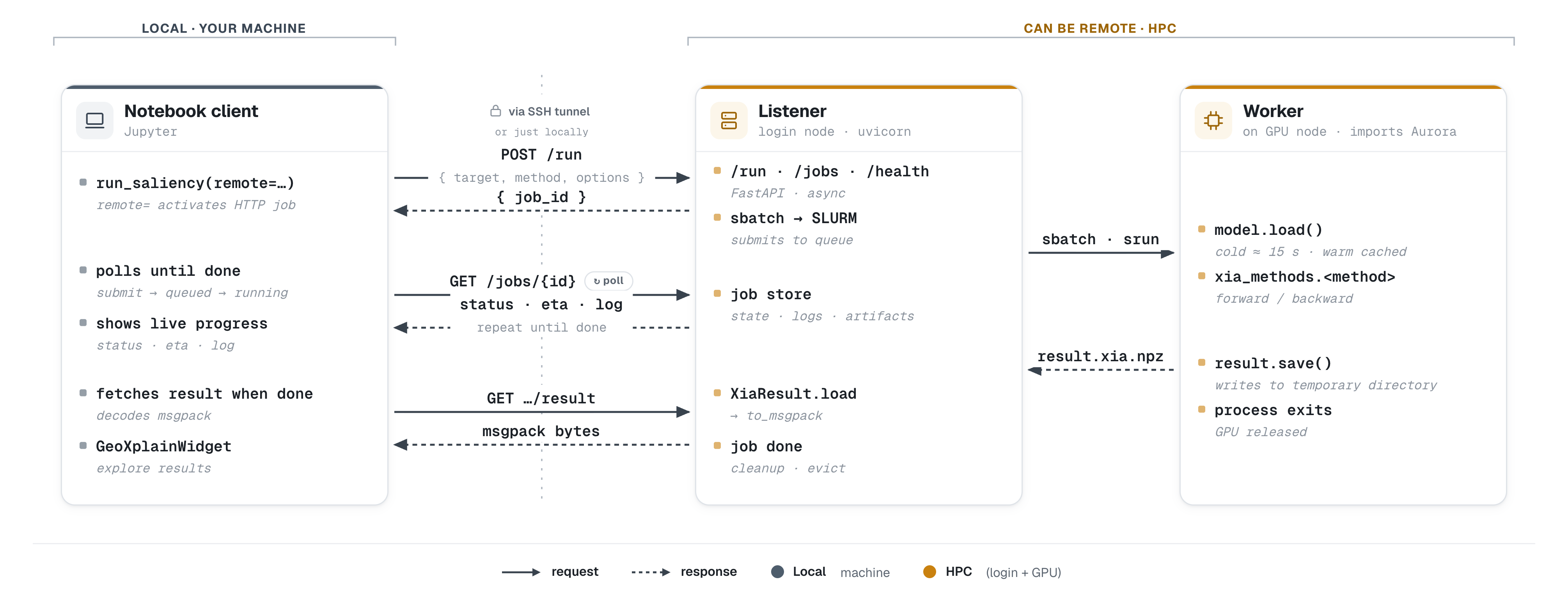
What remote="http://..." sets in motion. The notebook client (left, on your machine) POSTs a job, polls GET /jobs/{id} for status, ETA, and logs, then fetches packed result bytes — all over an SSH tunnel. On HPC, the listener hands the actual computation to a GPU worker through SLURM (sbatch/srun) and returns the result. Solid arrows are requests, dashed arrows are responses.
Start a listener
After configuring a gpu-listener or login-node setup profile:
If no listener config exists, listen stops and asks you to run setup first:
After setup, listen reads ~/.config/geoxplain-aurora-adapter/listen.toml
and starts without prompts. Inspect all current overrides with:
Call it from Python
When direct cluster-node access is unavailable, forward a local port through SSH and keep using the local URL:
Execution modes
| Mode | Execution model |
|---|---|
local |
Model and attribution run in the calling Python process. |
gpu-listener |
Listener and warm model run inside an existing GPU allocation. |
sbatch-oneshot |
Login-node listener submits one SLURM job per request. |
sbatch-persistent |
Login-node listener forwards requests to a long-lived GPU worker. |
The result contract is identical in every mode. checkpoint_path only affects local execution; remote checkpoint selection belongs to the listener configuration.
Retention
Two independent windows keep a long-lived listener from exhausting RAM or disk.
Both live in the [retention] section of listen.toml and can also be
overridden for one run with CLI flags:
| Setting | Covers | Default |
|---|---|---|
memory_retention / --memory-retention |
Completed jobs and cached result bytes in the listener's memory | 1h |
result_retention / --result-retention |
sbatch-oneshot on-disk result directories |
never |
Memory is bounded by default. A completed job only needs to live long enough for
the client to poll and fetch it, and unbounded growth there exhausts RAM.
On-disk results are cheap, so they are kept until you opt in. Values accept
never, a bare number of seconds, or <n>{s,m,h,d,w} such as 30m, 24h,
7d, or 30d.
Observe the listener
GET /health reports the resolved backend mode, model warmth, queue depth, and SLURM configuration when applicable. Submitted jobs progress through the status endpoint until the client fetches the packed result.
See the HTTP API reference when implementing a client other than geoxplain_aurora_adapter.