Compute with the Aurora backend
GeoXplain does not prescribe how attributions are computed. This guide covers its first packaged backend, geoxplain-aurora-adapter, which exposes one function per supported Aurora XAI method. Every function accepts a TargetSpec, a list of input variables to attribute, and the same local-or-remote dispatch choice.
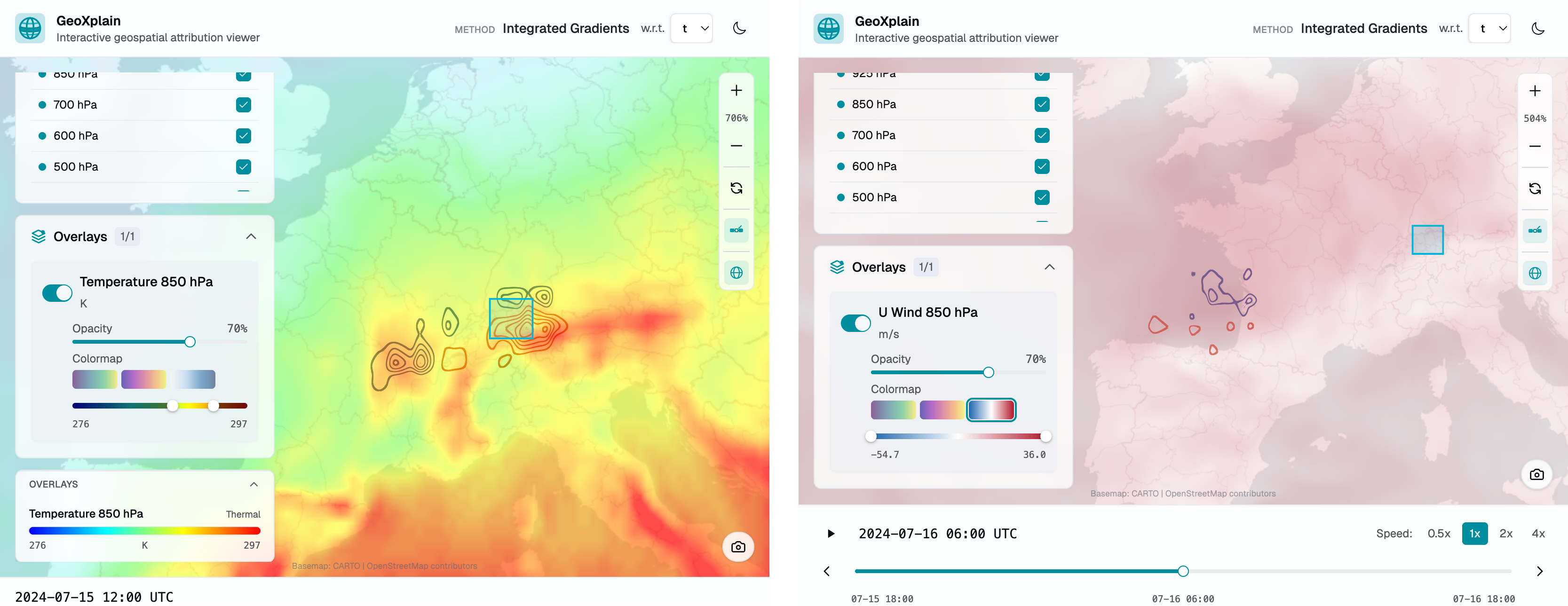
A computed result in the viewer. Left: Integrated Gradients attributions for an 850 hPa humidity target over Zurich (box, in blue), rendered as contour lines over an 850 hPa temperature overlay — red is positive, blue is negative attribution. Right: the second step of an autoregressive rollout of the same target, where influence has shifted upstream. The target, method, and input variables you set below are exactly what these frames explain.
Define the target
A target is the scalar model output being explained. Point targets use the nearest grid point; box targets explain the mean over a rectangular region.
For a box, lat and lon are its center and size=(dlat, dlon) is its full extent in degrees. The default extent is (2.0, 3.0). Use level=None for a surface output variable.
Choose a method
| Function | Method-specific options | Default work parameter |
|---|---|---|
run_saliency() |
None | One gradient computation |
run_ig() |
n_steps, baseline_sigma_deg |
n_steps=32 |
run_rise() |
n_masks, cells_h, cells_w, seed, baseline_sigma_deg |
n_masks=200 |
run_vit_cx() |
hook_stage, n_clusters, baseline_sigma_deg |
n_clusters=256 per input variable |
result = ax.run_ig(
    target=target,
    input=["t", "q", "z"],
    n_steps=32,
    baseline_sigma_deg=2.5,
    remote="http://localhost:8765",
)
input names the model input fields with respect to which attribution maps are produced. The returned XiaResult contains one nested level mapping for every requested input variable.
Compute consecutive timeframes
All four method functions accept timeframes and step_hours. The adapter starts at target.timestamp and creates timeframes targets at increasing step_hours intervals.
result = ax.run_saliency(
    target=target,
    input=["t", "q", "z"],
    timeframes=6,
    step_hours=6,
    remote="http://localhost:8765",
)
This returns one multi-frame XiaResult; it does not return a list of separate results.
Compute an autoregressive rollout
run_rollout() advances Aurora in fixed six-hour steps and explains the rollout frames. The current implementation supports Saliency and Integrated Gradients only.
result = ax.run_rollout(
    target=target,
    input=["t", "q", "z"],
    method="ig",
    timeframes=5,
    n_steps=32,
    remote="http://localhost:8765",
)
Passing method="rise" or method="vit_cx" currently raises NotImplementedError.
Save the result
The in-memory result can also be passed directly to GeoXplain or GeoXplainWidget; saving is optional.
See the generated Aurora adapter API for exact signatures and return types.